
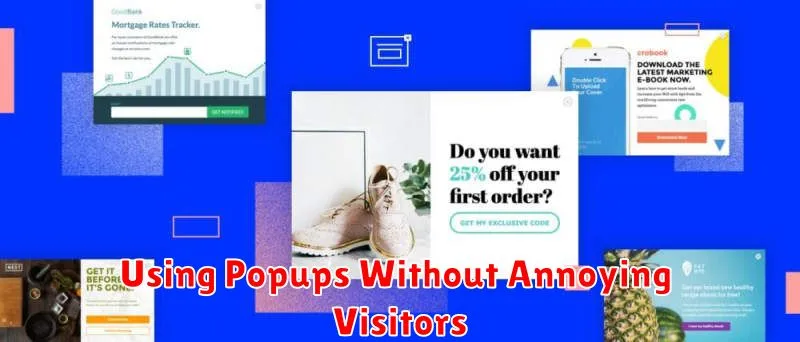
Popups. The word itself can evoke groans from internet users everywhere. While popups can be incredibly effective tools for boosting conversions, gathering leads, and promoting offers, they also have the unfortunate potential to annoy visitors and drive them away. This article will explore how to effectively utilize popups without annoying visitors. We’ll delve into best practices for popup design, timing, and targeting, ensuring that your popups contribute positively to the user experience rather than detract from it. Learn how to harness the power of popups without sacrificing user satisfaction.
Mastering the art of the non-intrusive popup is crucial for any website aiming to maximize its impact. By understanding how to implement popups strategically, you can transform them from a nuisance into a valuable asset. This guide will cover key strategies for creating popups that are not only effective but also respectful of your visitors’ time and browsing experience. Discover how to leverage popups for increased engagement and conversions without alienating your audience. Learn the secrets to creating popups without annoying visitors, ultimately enhancing your website’s overall performance.
Do Popups Still Work?
The short answer is yes, popups can still be effective. However, their effectiveness hinges on proper implementation and a focus on the user experience. Gone are the days of intrusive, irrelevant popups that frustrate visitors. Today, strategic and well-designed popups can still yield positive results.
When employed thoughtfully, popups can contribute to increased conversion rates. They can be instrumental in growing email lists, promoting special offers, and guiding visitors toward desired actions. The key is to ensure they are non-intrusive, relevant to the content, and offer genuine value to the user.
When to Show Popups
Timing is crucial for effective popup usage. Displaying them at the wrong moment can disrupt the user experience and lead to immediate dismissal. Consider these opportune times:
Entry Popups
These appear shortly after a visitor arrives on your site. While potentially intrusive, they can be effective for delivering critical information, such as promotions, if implemented thoughtfully. Consider a short delay or trigger after scrolling to avoid immediate frustration. A good strategy is to provide a small close button to avoid annoyance.
Exit-Intent Popups
Triggered when a user’s cursor moves towards the browser’s close button, these popups offer a last-chance opportunity to engage. They can be used to offer discounts, encourage newsletter sign-ups, or gather feedback.
Scroll-Triggered Popups
These appear after a visitor has scrolled a certain percentage of the page, indicating engagement with the content. This suggests a level of interest, making it a less intrusive time to present a popup related to the viewed material.
Timed Popups
These popups appear after a visitor has spent a specific amount of time on your site. Similar to scroll-triggered popups, this indicates engagement, providing a suitable opening for relevant offers or information. However, avoid overly short timers that can irritate users.
Design Tips for Better UX

Timing is everything. Avoid assaulting visitors with popups the moment they land on your page. Allow them some time to orient themselves and understand your content before presenting a popup.
Clarity and conciseness are crucial. Use clear and concise language in your popup. Explain the purpose and benefit quickly to avoid frustrating users.
Easy dismissal is essential. A prominent and easily clickable close button (an “X” or “Close”) is mandatory. Ensure users can quickly dismiss the popup without hassle.
Target your popups. Display relevant popups based on user behavior. For example, show exit-intent popups only when a visitor is about to leave your site.
Mobile optimization is non-negotiable. Ensure your popups are responsive and display correctly on various devices and screen sizes. A large popup on a small screen creates a negative user experience.
Limit the frequency. Don’t bombard visitors with multiple popups. Respect their time and attention by limiting the number of popups displayed per session.
Mobile-Friendly Popups
Popups can be effective tools for engagement, but they can be especially disruptive on mobile devices due to smaller screen sizes. Therefore, designing mobile-friendly popups is crucial for a positive user experience.
Ensure your popups are responsive, meaning they adapt to different screen sizes. Avoid popups that take up the entire screen, obstructing all content. Instead, opt for smaller, less intrusive designs that allow users to still interact with the underlying page.
Clear close buttons are essential. Users should be able to easily dismiss the popup without struggling to find a small “x” or close button. Consider using a larger, more prominent close button for mobile users.
Timing and frequency matter. Avoid showing popups immediately upon a user’s arrival on your mobile site. Give them a chance to explore the content first. Limit the frequency of popups to avoid overwhelming visitors.
Tracking Conversion Rates
Tracking the conversion rates of your popups is essential to understanding their effectiveness. By monitoring these metrics, you can determine whether your popups are contributing to your business goals.
Key performance indicators (KPIs) to monitor include:
- Conversion Rate: This is the percentage of visitors who complete the desired action within the popup, such as signing up for a newsletter or claiming a discount.
- Impression Rate: Track how often your popups are displayed to visitors.
- Close Rate: Understand how often visitors dismiss your popups without interacting.
Analyzing this data can reveal areas for improvement. For example, a high close rate may suggest that your popup content is not compelling or that its timing is disruptive.
Avoiding SEO Penalties
Search engine optimization (SEO) is crucial for website visibility. Using popups incorrectly can lead to penalties, negatively impacting your search rankings. Follow these guidelines to avoid such issues.
Mobile-Friendliness: Ensure your popups are responsive and don’t obstruct content on smaller screens. Google penalizes sites with intrusive interstitials that hinder the mobile user experience. Test your popups thoroughly on various devices.
Timing and Frequency: Avoid showing popups immediately upon a visitor’s arrival. Allow them time to engage with your content before presenting a popup. Limit the frequency of popups to prevent annoyance and potential penalties.
Clear Value Proposition: Popups should offer genuine value to the visitor, such as exclusive discounts or helpful resources. Irrelevant or deceptive popups are detrimental to the user experience and can harm your SEO.
